Open and run Excel workbooks in the browser.
Sheetwarden opens, calculates, renders and edits .xlsx, .xlsm, .xlsb and .xls files with no server, no upload and no Office installation. Formulas, PivotTables, charts, conditional formatting and a VBA runtime, in one TypeScript library you drop into your product.
Free to evaluate on localhost and staging. Licensed per developer for production. Files never leave the browser, including in the demo.
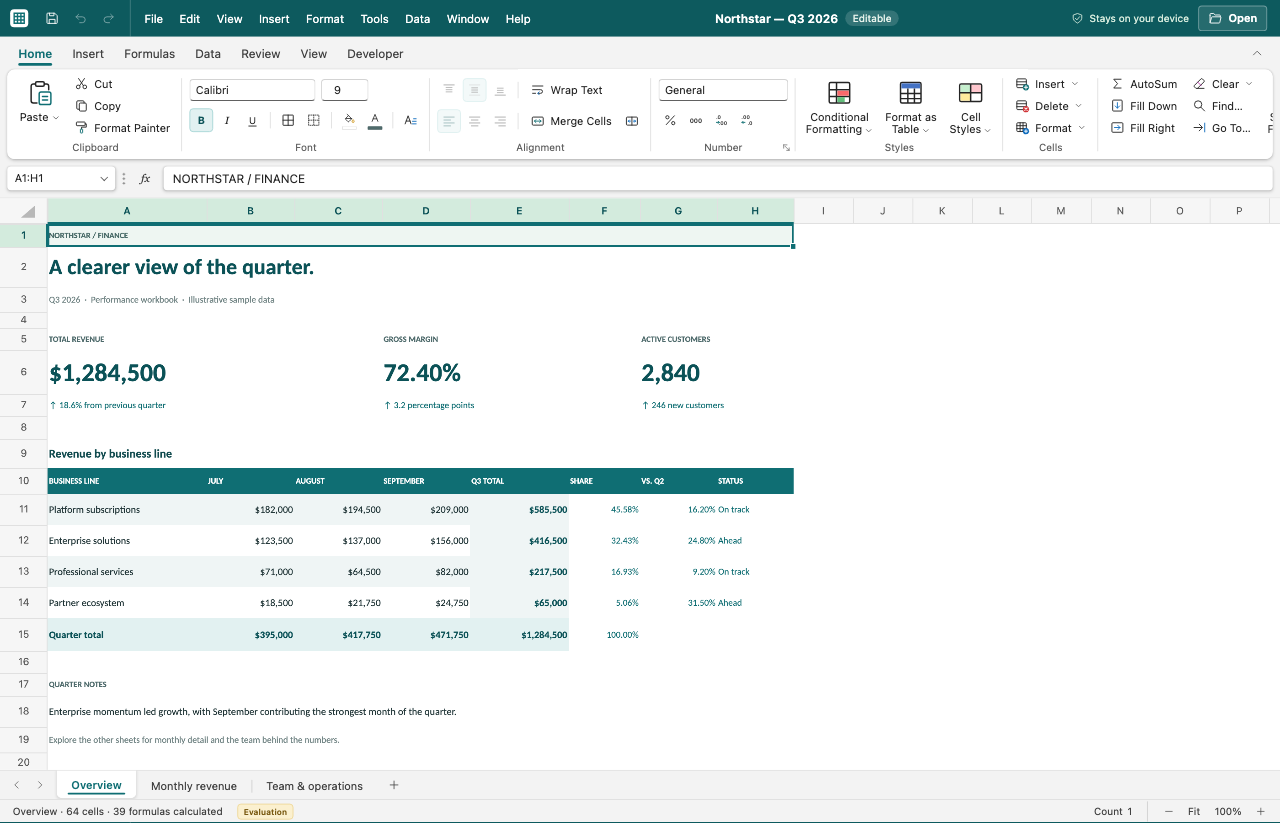
The viewer with a workbook open.
Try it by task
Preview a report, change a forecast or analyse 5,000 sales records. Each demo includes sample data and a walkthrough.
What is included
Most browser spreadsheet components render a grid and send the hard parts to a server. This library does the parsing, calculation and rendering itself.
Faithful rendering
Fonts, fills, borders, number formats, merged cells, rich text, theme colours and tints, table styles, sparklines, conditional formatting with icon sets and data bars. Cells are drawn on a canvas, so very large sheets stay responsive.
Real calculation
A TypeScript formula engine with dynamic arrays and spills, structured table references, defined names, iterative calculation, what-if data tables and scenarios. Honours the workbook's saved calculation mode and recalculates on demand.
PivotTables that work
Multiple row, column and filter axes, measures, grouping, calculated fields and items, Show Values As, linked slicers and timelines, and drill-through to source records. Layout updates in place.
Charts and drawings
Native chart types from modern and BIFF workbooks, selectable pictures and shapes, and legacy metafile and QuickDraw image decoding for older workbooks.
Editing and data tools
Cell editing with formula assistance, fill handle, paste special, find and replace, sort and filter, remove duplicates, text to columns, data validation, outlines, sheet protection, undo and redo, and export back to a modified workbook.
VBA runtime
Imports XLSM projects and runs macros, worksheet functions, events, buttons and modal UserForms in a worker. Desktop-only calls such as the file system and shell work against configurable browser stand-ins. Off by default; the host enables it per workbook.
Macros, forms and a proper editor
XLSM workbooks keep working in the browser: UserForms, buttons, events, worksheet functions and the macros behind them, all executed locally after the user enables them. When something needs changing, the built-in Visual Basic editor has the tooling developers expect today, which the desktop VBE has never gained.
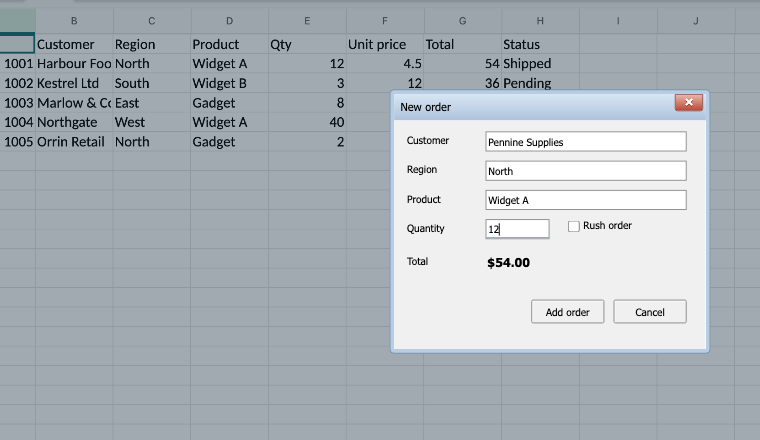
An order form from an XLSM file.
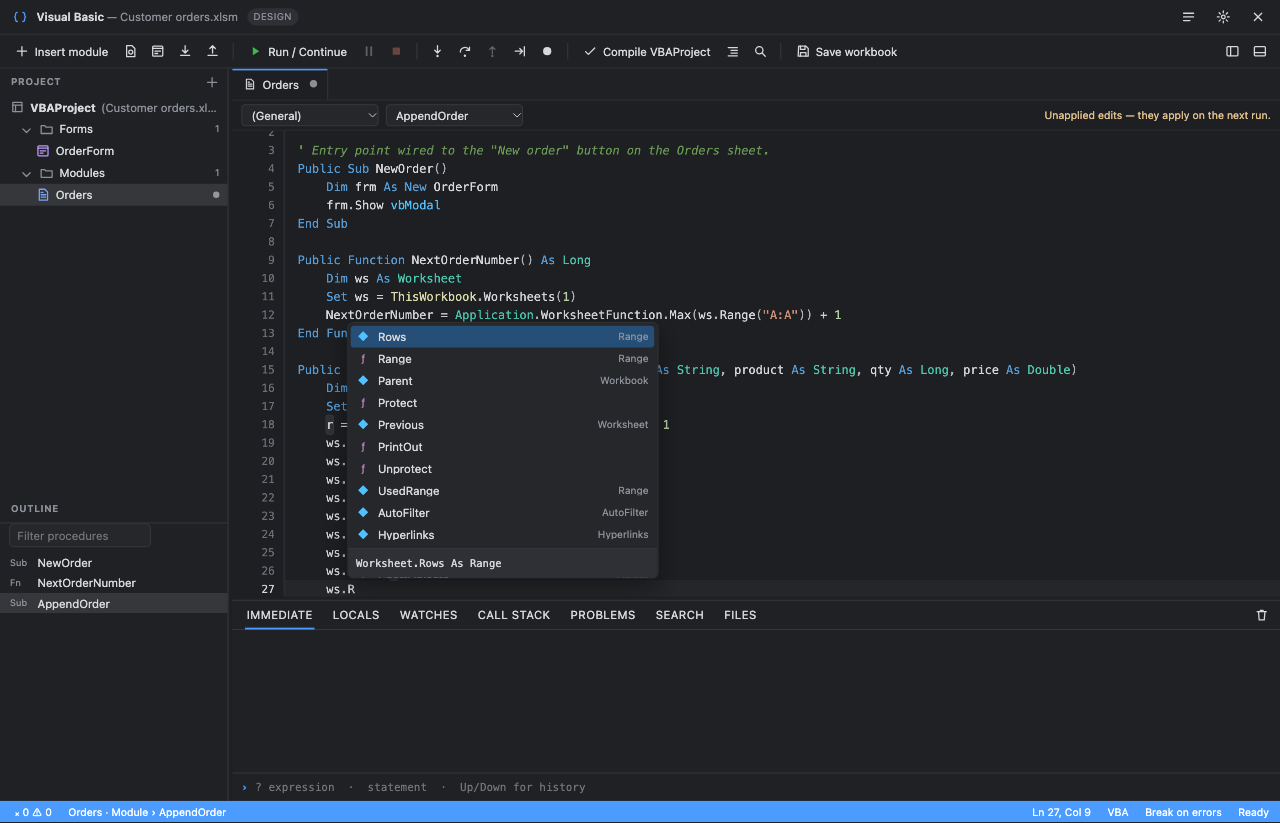
The Visual Basic editor, with completion for the Worksheet object.
What runs
- Standard, class and document modules, user-defined types, arrays, error handling
- Workbook, Worksheet, Range, Names, Charts, PivotTables, Shapes and form controls
- Worksheet UDFs, workbook and sheet events, OnKey and OnTime
- Modal and modeless UserForms with the standard controls and keyboard navigation
- Saving back to XLSM with the project intact
Editor tooling
- IntelliSense that follows member chains, With blocks, user types and class modules
- Live diagnostics while you type, including undeclared assignments, unused variables and missing Option Explicit
- Go to definition, find references and project-wide rename
- Conditional breakpoints, step into, over and out, locals, watches, call stack and data tips
- Command palette, regex find and replace, smart indenter, auto-closing blocks
Form designer and desktop stand-ins
- Draw, align, distribute and snap controls; property grid; double-click into handlers
- Forms are saved as real MS-OFORMS designer data, so they open in desktop Excel
- File statements and FileSystemObject use a browser-side drive with upload and download
- GetSetting, Environ, RegExp and XMLHTTP map to browser equivalents
- Shell, SendKeys and other desktop-only calls are refused safely instead of crashing the macro
The file never leaves the browser.
There is no conversion service, no temporary storage and no third-party processor to add to your data-processing agreement. For regulated customers this is usually the deciding factor.
- Nothing to host or patch; the library is a static bundle.
- Works offline once loaded, including on locked-down desktops.
- Shadow DOM isolation keeps your styles and ours apart.
- Cancellable parsing in a Web Worker keeps the UI responsive on large files.
Who embeds this
- Document management and data-room products previewing client spreadsheets.
- Email, chat and collaboration tools showing attachments inline.
- E-discovery and compliance platforms that cannot send files to a third party.
- Finance, insurance and actuarial software with macro-driven workbooks to keep alive.
- Learning platforms grading submitted workbooks in the browser.
Integration
Install the package
Licensed customers receive access to the private npm package and the versioned release archive.
Mount the viewer
One call on any element. The viewer ships its own styles inside a Shadow DOM and loads heavy modules on demand.
Load a file
Pass a File, Blob or ArrayBuffer. Parsing happens in a worker, with progress and cancellation.
import { createExcelViewer } from '@sheetwarden/viewer';

const viewer = createExcelViewer(document.getElementById('workbook'), {
  licenseKey: 'SW1.…',          // omit while evaluating; an Evaluation badge appears
  readOnly: false,
  onChange: book => save(book),  // edited workbook model, exportable back to .xlsx
});

await viewer.loadFile(fileInput.files[0]);
Run an integration example or download a JavaScript, React or Vue starter. Full API, licence-key handling and the feature support matrix are in the documentation.
Compared with the alternatives
| Capability | Sheetwarden | Server-side conversion to HTML | Grid components | Office Online embed |
|---|---|---|---|---|
| File stays in the browser | Yes | No | Yes | No |
| Live formula recalculation | Yes | No | Partial | Yes |
| PivotTables, slicers, timelines | Yes | Static snapshot | Rare | Yes |
| Legacy .xls and .xlsb | Yes | Usually | Via converter | Yes |
| VBA macros run | Yes, client-side | No | No | No |
| Works offline and self-hosted | Yes | Needs server | Yes | No |
| Requires end-user Microsoft licence | No | No | No | Yes |
Pricing
Licences cover the developers who work with the library. Deploy to as many of your own users and domains as you like. Prices in US dollars, billed annually.
Viewer
Open, render and explore workbooks with full fidelity.
- All formats: xlsx, xlsm, xlsb, xls, csv, tsv
- Formula engine and recalculation
- PivotTable, chart and drawing rendering
- Find, filter, sort, copy and CSV export
- Legacy drawing and font decoding
- Editing, authoring and workbook export
- VBA runtime
- Email support, 1 year of updates
Professional
Everything in Viewer plus editing, data tools, export and the VBA runtime.
- Everything in Viewer
- Cell, table, chart and conditional format editing
- PivotTable authoring, slicers and timelines
- Data validation, protection, outlines, what-if
- Export modified workbooks to xlsx and xlsm
- Undo and redo, paste special, fill, text to columns
- VBA runtime: macros, UDFs, events, UserForms
- Priority email support, 1 year of updates
Enterprise
OEM redistribution, source access and a support agreement.
Annual agreement, invoiced
- Everything in Professional
- OEM and SaaS redistribution rights
- Unlimited developers on one agreement
- Fidelity fixes for your customers' workbooks
- Source access under NDA, source escrow
- Security questionnaire and DPA support
- Named engineer, response-time commitments
Evaluation is free with no time limit. Without a key the viewer shows a small "Evaluation" badge in its status bar and is otherwise fully functional.
Open-source projects and companies under ten people can ask for a discount. Students and non-commercial use are free on request.
A developer is anyone who writes or maintains code that calls the library. Buying for a team is a seat count on one key. VAT or sales tax is added at checkout where applicable.
Guides
Render xlsx in the browser without a server
Why conversion services and grid components fall short, and what client-side rendering gives you.
Run Excel macros in the browser
How xlsm projects, UserForms and events execute locally, and what happens to Windows-only calls.
SheetJS, SpreadJS, Handsontable or this?
A plain comparison of the ways to handle Excel files in a web app, including where we are weaker.
Frequently asked questions
Does any data leave the browser?
No. Parsing, calculation, rendering and macro execution run in the page and its Web Workers. The library makes no network requests. The licence check is a signature verification against a public key embedded in the bundle, so it does not phone home either.
How is the licence enforced?
You pass a signed key to the viewer. The key encodes your company, tier, seat count, expiry and optionally your production domains. Without a valid key the viewer shows an evaluation badge. It never disables features or breaks at expiry; there is a two-week grace period, after which the badge returns. The licence agreement is the enforcement, not a kill switch in your product.
Is the source code available?
The library is closed source and shipped as a built, typed ES module. Enterprise customers can review the source under NDA and arrange escrow. Type definitions and documentation are public.
How complete is the formula and VBA support?
The formula engine covers the functions found in ordinary business workbooks, including dynamic arrays and modern lookup functions, and is tested against workbooks calculated by Excel. The VBA runtime implements the core language, the common Excel object model, standard UserForms and events; Windows-specific APIs run against browser stand-ins. The documentation lists the current support and limits honestly. If a workbook you care about does not open or calculate correctly, send it to us. Fixing real files is how the product improves.
Can we modify the viewer's appearance?
Yes. The viewer renders inside a Shadow DOM so your styles do not collide with it, and exposes options for read-only mode, the inspector panel, fonts, and callbacks for load, change and error events. Enterprise agreements can include custom chrome.
What happens when the licence year ends?
Your deployed software keeps working. Renewing keeps you entitled to new versions and support, and you receive a fresh key. If you do not renew, you may continue using the last version you were licensed for, and the badge appears after the grace period only in builds that check the date.
Which browsers are supported?
Current versions of Chrome, Edge, Firefox and Safari on desktop, and the same engines on tablets. The UI is designed for a pointer and keyboard; it works on touch screens with a mobile layout for narrow widths.
Try it with your own files
Open the demo and drop in a workbook that other viewers struggle with. If it works for you, get in touch about a licence.